Bilibili English App | Free Anime Streaming & Download Guide
338.93 MB
6.5.0
Android/IOS/PC
10M+

Description
If you are a fan of licensed anime, gaming videos, or Asian pop culture, you have likely come across the platform known as bilibili english. Originally founded as a powerhouse community for ACG (Anime, Comic, and Games) enthusiasts in China, Bilibili expanded globally with a dedicated international app designed specifically for English-speaking audiences.
Whether you want to stream the latest seasonal anime in full HD, explore live gaming broadcasts, or interact with creators worldwide, this guide breaks down everything you need to know about the app.
What is Bilibili English?
The global version of Bilibili often listed in app stores as bilibili – All Your Fav Videos or Bilibili Global is a localized streaming platform tailored for an international audience. Unlike the original regional application, the global edition features an English-first user interface, localized menus, and multi-language subtitle options.
Key Highlights
- Official Licensed Anime: Access popular series with high-quality resolution options.
- Danmaku (Bullet Comments): Experience real-time floating comments on screen from other viewers as the scene plays.
- Creator-Generated Content: Watch gaming tutorials, tech reviews, lifestyle vlogs, and street food videos.
- Ad-Free Base Streaming: Enjoy smooth video playback without constant popup ad interruptions.
App Specifications & Fast Download Options
For users looking to install or update the app on their mobile devices, here is a quick overview of the application specs along with quick download options:
| Specification | Details |
| App Name | Bilibili (Global / English Edition) |
| Developer | BILIBILI HK |
| Supported Platforms | Android, iOS, Web Browsers |
| License | Free (Optional Premium / VIP Subscription) |
| Supported Languages | English, Traditional Chinese, Indonesian, Thai, Vietnamese, and more |
Download the Bilibili App
You can choose your preferred device platform below to get the official latest version:
- Official Google Play Store: Search for “bilibili – All Your Fav Videos” directly on the Google Play Store on your device.
- Official Apple App Store: Search for “bilibili” on the iOS App Store to download on iPhone or iPad.
- Direct Mobile Web Access: Find the bilibili.tv in your mobile or desktop browser to stream instantly without app installation.
Standout Features of Bilibili English
+-------------------------------------------------------------+
|                     BILIBILI FEATURES                       |
+------------------------------+------------------------------+
|      ANIME & CREATORS        |      INTERACTIVE COMMUNITY   |
|  - Licensed HD Anime         |  - Danmaku Bullet Comments   |
|  - Esports & Gaming Streams  |  - Multilingual Subtitles    |
|  - Tech & Vlogging Content   |  - Offline Viewing & Downloads|
+------------------------------+------------------------------+
1. High-Definition Anime Streaming
Bilibili holds licensing rights for dozens of trending seasonal anime series. Users can browse by air date using the in-app Anime Calendar or filter titles by popularity, genre, and recommendations.
2. Multi-Language Subtitles & AI Dubbing
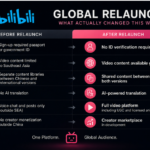
Understanding content across languages is effortless on Bilibili English. In addition to community-translated soft subtitles, modern updates to the global app introduce AI-assisted translation and dubbing tools to help break down language barriers across global creator uploads.
3. Danmaku (Bullet Comments)
One of Bilibili’s trademark features is Danmaku—a system where viewer reactions fly across the video screen at the exact timestamp they were written. It adds a communal “watch party” feel to every episode. If you prefer an uncluttered view, you can easily adjust opacity, text size, or toggle comments off entirely.
4. Offline Downloads
Traveling or dealing with limited data? Bilibili permits offline caching for supported videos, allowing you to download episodes ahead of time and watch them on the go.
Simple Guide: Setting Up Bilibili in English
Follow these steps to customize your viewing preferences right after installation:
1.Install and Open the App:
Launch the app on your Android or iOS device. You can start browsing trending clips right away without creating an account.
2.Adjust Language Settings:
Go to Me / Profile Settings > Language Settings and confirm that English is set as your default UI language.
3.Configure Subtitle Preferences:
Start playing any anime episode or creator video. Tap the CC / Subtitle button on the bottom right of the video player and choose English.
4.Create a Free Account:
Log in using your Google account or email address to enable interactive features like commenting, liking, following creators, and saving watchlists.
Frequently Asked Questions (FAQ)
Is Bilibili English free to use?
Yes, the app is free to download and watch. Many anime series and creator videos are available in standard HD for free. An optional Premium subscription unlocks early-access episodes and 1080p/4K resolution options.
How do I turn off comments floating across the video?
Tap the video player while playing content to bring up the overlay controls, then tap the Danmaku icon (looks like a small chat box) to toggle bullet comments on or off.
Can I upload my own videos on Bilibili English?
Yes! Bilibili functions as a creator platform. Once registered, you can upload videos, post channel updates, and build a following directly within the global community.
Explore More Related Guidance about : 1- BiliBili APP.
Thank You
Download links
How to install Bilibili English App | Free Anime Streaming & Download Guide APK?
1. Tap the downloaded Bilibili English App | Free Anime Streaming & Download Guide APK file.
2. Touch install.
3. Follow the steps on the screen.